The smart focus lockbox.

I built this for myself over summer 2026: set a timer, drop your phone in, and a servo-driven latch keeps it physically locked away until you're done. A touchscreen countdown, a tunable emergency override, and a BLE companion app.

Personal project · not for sale

  • True physical lockaway
  • Two full enclosure revisions
  • Rechargeable & opaque
Checkpoint tray · 02

3D-printed enclosure · 1.47" touchscreen · servo latch · USB-C

Your phone always wins.

App blockers are one settings toggle from defeat. A drawer is one weak moment away. Willpower loses to a device engineered to capture it. The only thing that reliably works is putting the phone somewhere you genuinely can't reach it — and then making that easy, honest, and safe.

1toggle to defeat a software blocker 0notifications you can see through an opaque box 25deliberate presses for the emergency way out

How it actually got built.

Two enclosure revisions, a pile of test prints, and a clear line between what I did and what an agent did.

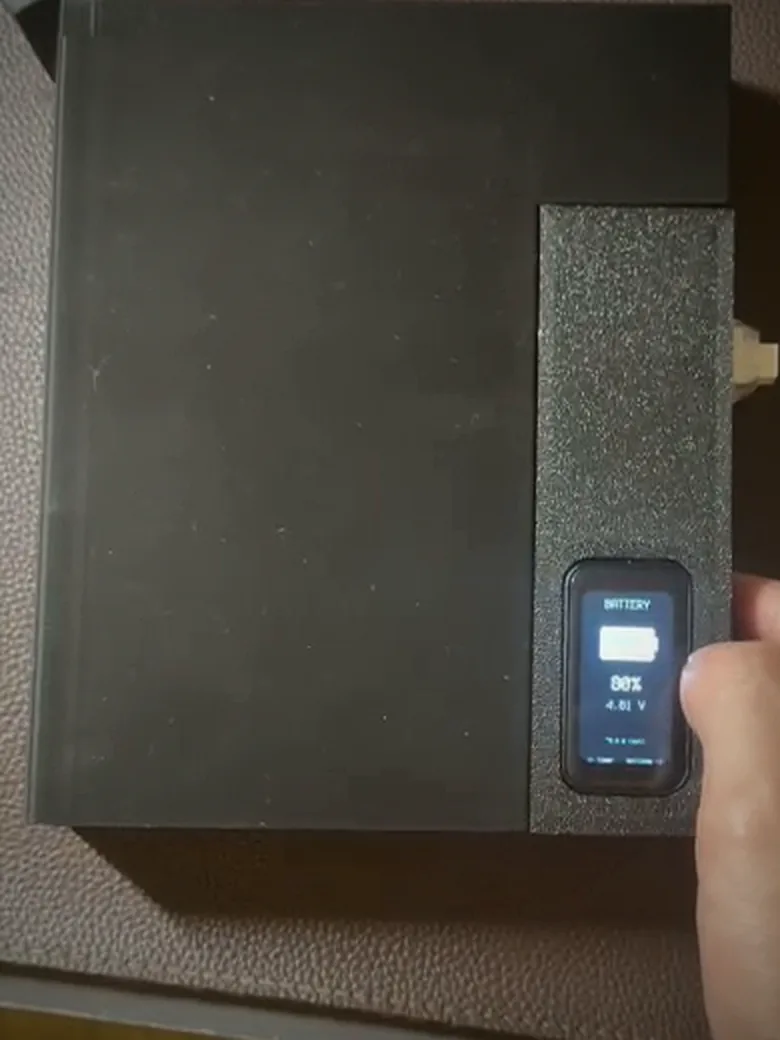
The finished Phone Box: a matte black 3D-printed enclosure with visible layer lines, its 1.47-inch touchscreen reading BATTERY, 88 percent, 4.01 volts, held in one hand.
The battery view, reading off the MAX17043 — 88%, 4.01 V.
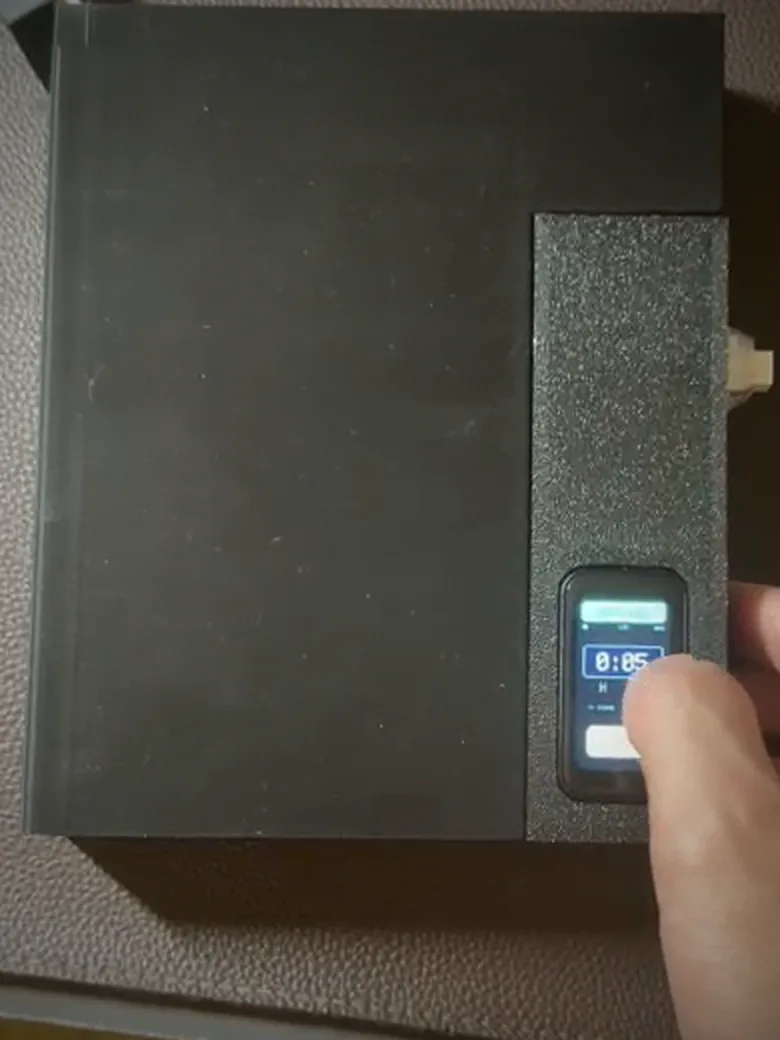
The same box with a finger on the touchscreen, setting a timer that reads 0:05, with the lock button below it.
Setting a lock on the panel itself. No phone involved.

Both are frames lifted from a clip of the actual box, so they are softer than I would like. They are here because a render proves nothing and this proves the thing exists. The source is a private repo — happy to walk anyone through the tree.

No. 1

Print the joint before you print the box

The enclosure is mine end to end — modelled in SolidWorks and drawn for FDM printing, through two full revisions. Every interface that could bite got its own throwaway coupon first: a hinge, the charger port, the screen bezel, the latch tab, the power switch, and a housing for the on/off button. Each one printed, offered up to the real component, and binned.

Only once those passed did a full V2 assembly get committed to a multi-hour print. The dates below are the CAD files themselves — six coupons in five days, five of them in a single session, then the assembly.

Fit-test log V1 → V2
Main case + lid, rev 1
17–22 Aug
Hinge coupon
18 Aug
Charger-port coupon
18 Aug
Latch-tab coupon
18 Aug
Power-switch coupon
18 Aug
On/off button housing
18 Aug
Screen-bezel coupon
22 Aug
Full V2 assembly
24 Aug
SolidWorks · FDM · two revisions
No. 2

The servo kept dying, and only on real hardware

Locks failed intermittently, and never in anything I could reason about on screen. I found it by running lock cycles on the bench until the pattern showed up. It turned out to be two faults wearing one coat: the CPU clock scaling out from under the servo's PWM timer, and a motor that pulls close to an amp hanging off a rail that cannot supply it. The firmware re-asserts 50 Hz on every move, and the servo runs from the battery rail with bulk capacitance rather than 3.3 V.

Found on hardware
No. 3

Getting a battery reading at all

The ESP32-S3 board has no fuel gauge. I bought a MAX17043 breakout and modified it by hand — disconnecting lines, soldering, crimping — until the box could report a real state of charge instead of guessing from a raw ADC voltage.

Soldering · crimping
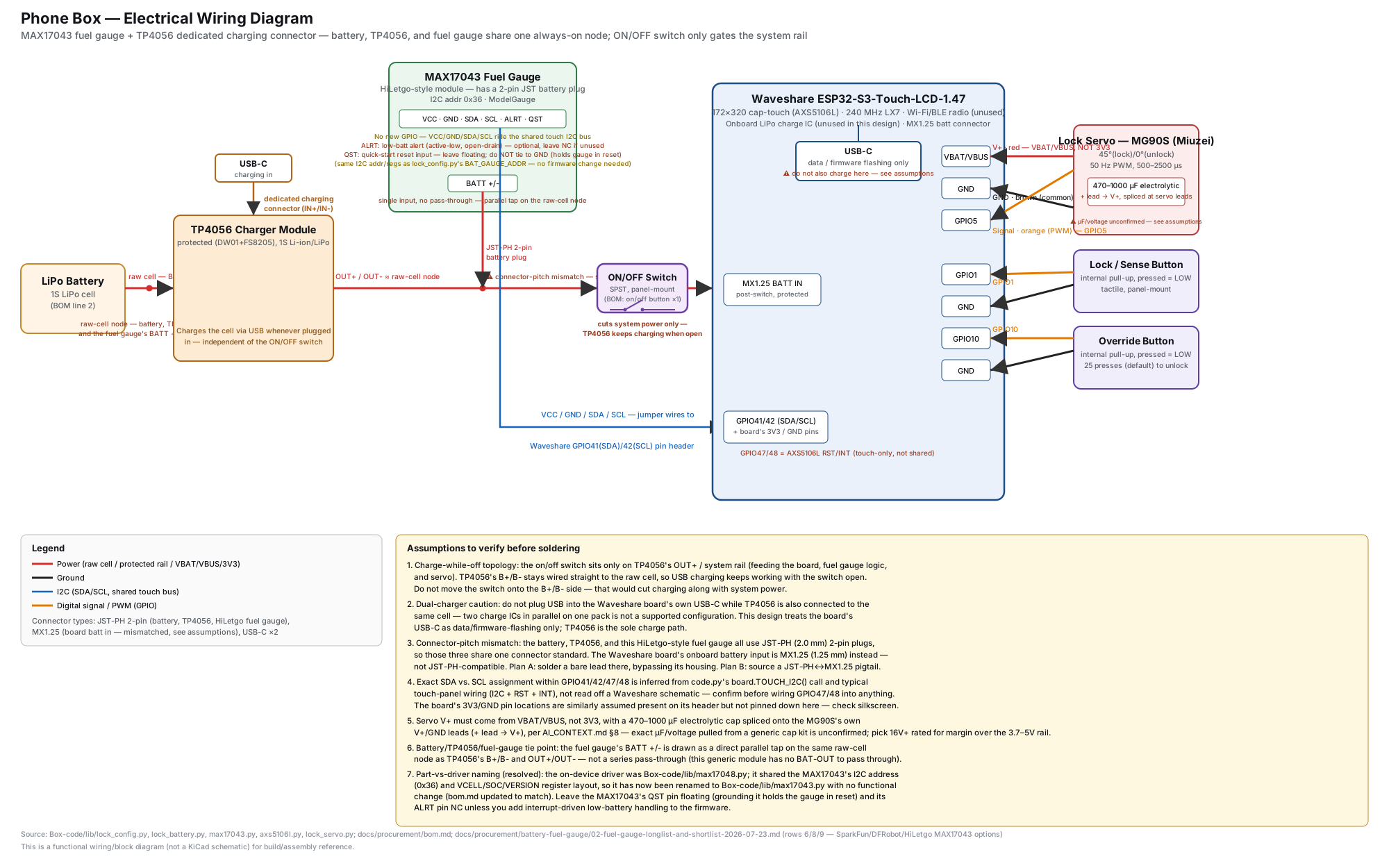
Electrical wiring diagram for Phone Box: the ESP32-S3 board with its 1.47-inch touchscreen, the MAX17043 fuel gauge on I2C, the LiPo cell and USB-C charge path, the servo on GPIO5 powered from the battery rail rather than 3.3 volts, and the override button.
What is actually wired together inside the box — the servo on its own supply rather than the 3.3 V rail, and the MAX17043 on I2C. Open it full size if the pin labels are too small to read here.
Chain of custody No. 0417

Signed by me

  • Industrial and mechanical design — two full enclosure revisions in SolidWorks, drawn for FDM printing
  • Every fit-test part, printed and checked against the real component before committing to an assembly
  • The MAX17043 breakout modification — lines disconnected, soldered, crimped by hand
  • Finding the faults on real hardware: the intermittent servo failures and the touchscreen dropping frames
  • Specifying what the box should do, testing every build on the physical device, and debugging what came back wrong
  • Tooling calls: parametric-CAD MCP to screen battery candidates for enclosure fit, and cutting an agent-swarm framework whose subagents cut token cost but never reported results back

Signed by Claude Code

  • Most of the CircuitPython firmware, including the servo state machine and the custom AXS5106L touch driver
  • Most of the React Native (Expo) companion app and the Firebase backend behind it, plus the two native iOS modules it leans on — call-observer and background-wake
  • Diagnosing the root cause of the servo brownout once I'd found it, and the capacitor fix that solved it
  • The touch debounce fix for the frames the controller drops mid-touch
  • The wiring diagram above, derived from the firmware’s own config and driver files

I can't write React Native cold and I didn't write the firmware. I decided what the box should do, built the thing it runs inside, tested every revision on real hardware, and drove the agent that wrote the code across 200-plus commits. Saying that plainly seemed better than letting anyone find out in an interview.

Engineered like a real device, not a phone jail.

No. 1

Real enforcement, a sane escape hatch

A servo-driven latch holds the box physically shut until your timer ends. Need out early? A tunable press-count override (default 25) is your controlled way back in — not a bypass hole, not a total dead end like kSafe.

Core mechanism
No. 2

A touchscreen in a category of dials

Swipe to set hours, minutes and seconds. Watch a live countdown, check the battery, tweak settings — all on a crisp 1.47" screen. The AXS5106L touch controller had no CircuitPython driver, so the box runs a custom one over I2C — including a debounce fix for the frames the controller intermittently drops mid-touch.

No. 3

Every routine lives on the device

Schedules, routines and focus streaks live in the microcontroller's own non-volatile memory — no cloud account, no host-writable filesystem. State survives a full power cut, and a brownout counter in that same NVM drives automatic recovery when the servo's inrush current browns out the board mid-lock.

No. 4

Opaque, rechargeable, honest build

An opaque enclosure means no seeing notifications through the case. USB-C charging and a rechargeable LiPo. The board has no fuel gauge, so I added one: a MAX17043 breakout, modified by hand — cutting the traces tying its 3 V rail to the battery rail, then soldering and crimping it in. It shares the touchscreen's I2C bus at 0x36, so it costs no extra GPIO.

Four steps to a focused hour.

  1. No. 1

    Set your timer

    Swipe up or down on the touchscreen to dial in hours, minutes and seconds — anywhere from a few minutes to 9 hours.

  2. No. 2

    Drop the phone in

    Place your phone inside and close the opaque lid. Out of sight, out of reach, out of mind.

  3. No. 3

    The box locks

    The servo drives the latch shut and the countdown begins. The box will not open on its own until time is up.

  4. No. 4

    Unlock when done

    When the timer expires the latch releases automatically. In a real emergency, the press-count override lets you out early.

You decide how strict it is.

Phone Box bends to how you focus. Dial these in right on the touchscreen — your settings are saved on the device and survive a power-off. No app required to use the core lock.

Emergency override

5–500 presses
Override screen, redrawn from the firmware’s own UI geometry

Set how hard it is to bail out early. Make it a light 5-press nudge or a serious 500-press commitment, in steps of 5. Default is 25.

Try the default 25-press override right here. On the box itself, every release is written to on-device memory:

0 / 25

Focus length

Up to 9 hours

Swipe to set hours, minutes and seconds — a quick 20-minute sprint or a full 9-hour deep-work day.

Screen sleep

On battery

Choose how quickly the display sleeps to stretch battery life while the countdown keeps running.

10s20s30s60s

Brightness

10–100%

Set the backlight to taste. Phone Box also brightens on USB power and dims on battery on its own.

10%30%50%70%100%

Schedules & streaks

Built in

Recurring focus routines and on-device streaks live entirely in the firmware — no app or account needed to use them.

RoutinesStreaksFocus stats

It remembers

Saved on device

Every preference is written to on-board memory, so your setup is exactly how you left it after a recharge or reboot. Set it once.

PersistentNo accountOffline

The manifest, plainly stated.

No vague “smart” marketing — this is the actual hardware inside the box.

Property manifest No. 0417
Display
1.47″ touchscreen
Latch mechanism
Servo-driven, physically locked
Charging
USB-C
Power
Rechargeable LiPo battery
Enclosure
Opaque, 3D-printed
Emergency override
5–500 presses, tunable (default 25)
Focus session length
Up to 9 hours
Settings storage
On-device, survives power-off
Connectivity required
None — no account, fully offline
Firmware
CircuitPython on ESP32-S3
Companion app
iOS, custom BLE protocol

Why a box, not an app.

I looked at software blockers and dumb lockboxes before building this one. Here's how they actually compare.

Comparison of Phone Box against kSafe, generic Amazon boxes, Brick, Opal, and GoAro
Feature Phone Box kSafe Amazon boxes Brick Opal GoAro
Locks the phone physically away Yes Yes Partial No No Yes
Touchscreen interface Yes Dial Dial App App App
Tunable emergency override Yes None Holes No Toggle App
Rechargeable & opaque Yes Clear Varies n/a n/a Yes

To be fair: a commodity box is cheaper, and Brick fits in a pocket. Neither has a touchscreen or a tunable override — and building one myself was half the point.

Questions you're already asking.

Claimed by No. 0417

Evan Mah

Mechanical engineering undergraduate, Northeastern University · Boston, MA

I build hardware and drive agents to write the software around it. Phone Box was a summer 2026 project: I wanted one, nothing on the market did what I needed, so I designed the enclosure in SolidWorks, modified the electronics by hand, and used Claude Code to take it from firmware through a React Native app on iOS. It has never been sold. It sits on my desk and it works.

I’m looking for a mechanical engineering co-op for July–December 2027.